 Bearzenker
Controller's brief
Bearzenker
Controller's brief
ATC — Claude
A square grid, blue information panels, and nothing on the screen that the specification did not ask for. The leanest of the four builds, and the easiest to learn.
Read the scope
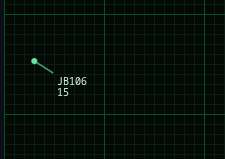
Aircraft enter at the edge of the radar. The dot is the airplane; the line is its direction of travel. The tag carries the flight number and the altitude in thousands of feet — 9 means 9,000 feet. Look closely at the call signs: this build quietly uses real airline identifiers rather than random letters.
Select an aircraft
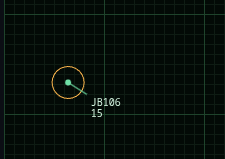
Click the dot. The aircraft is highlighted with a circle, and it is now the target of whatever you do next — either a typed command, or a click on the map.
Give it somewhere to be
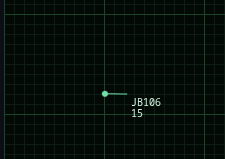
Click a destination and the pilot steers as needed to reach it, turning 30 degrees per turn. There is no destination marker in this build — you are tracking your own plan.
The mistake everyone makes: when the aircraft reaches its destination, it does not stop. It flies the same heading straight off your scope until you issue another command. Aircraft that leave the map count against your score.
Work the altitude
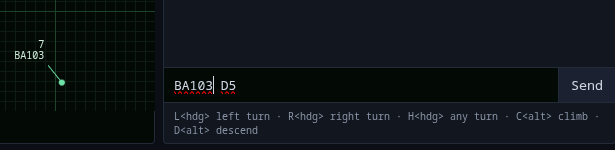
There is no altitude slider, and that is deliberate. Altitude is typed. Use the chat window in the lower right: give the flight number, then the command.
L270   turn left to heading 270
R090   turn right to heading 090
H180   turn to heading 180, your choice of direction
C11    climb to 11,000 feet
D5     descend to 5,000 feet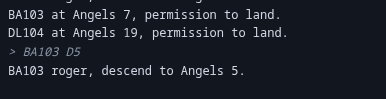
The pilot acknowledges and works to the ordered altitude at 2,000 feet per turn. Start descending early — a plane at 11,000 feet needs three turns of lead time before it can accept an approach.
Deliver it to final approach
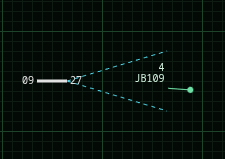
The dotted V extending from the runway is the approach vector. Get the aircraft inside it, pointed roughly the right way, and low enough — between 2,000 and 5,000 feet — and the pilot takes over and lands. You do not fly the landing; you set it up.
Three ways to lose points
- A near miss — two aircraft within two blocks at the same altitude.
- A lost aircraft, flown off the edge of the scope.
- A collision, which is not a penalty. It is the end of the game.
Fly the level out
Level one runs 60 turns. Two aircraft start on the scope and one more arrives every five turns, six in total. Turns advance on a five-second beat, and you may issue orders during the pause.
When the clock expires, aircraft already on approach keep flying until they land — they are the tower's problem now, not yours. Once the last one is down, the chat posts your final score.
=== Level complete. Final score: 600 ===Scope is warm. Six inbounds and sixty turns.
Take the scope →Technology preview. Entertainment purposes only. No code here has been reviewed by a human.